Appium 自动化测试实战 1
by 西西
目录
- Appium 框架介绍
- Appium 环境
- Appium Inspector 工具介绍
- 企业微信 app 实战 - 自动打卡案例
App 测试的时代背景
- 按月发布->按周发布->按小时发布
- 多端发布: Android、iOS、微信小程序、h5
- 多环境发布: 联调环境、测试环境、预发布环境、线上环境
- 多机型发布: 众多设备型号、众多系统版本
- 多版本共存: 用户群体中存在多个不同的版本
- 历史回归测试任务: 成百上千条业务用例如何回归
总结:加班 + 背锅
Appium 介绍
- 跨语言 Java、Python、nodejs 等
- 跨平台
- Andoid、iOS
- Windows、Mac
- 底层多引擎可切换
- 生态丰富,社区强大
Appium 框架结构
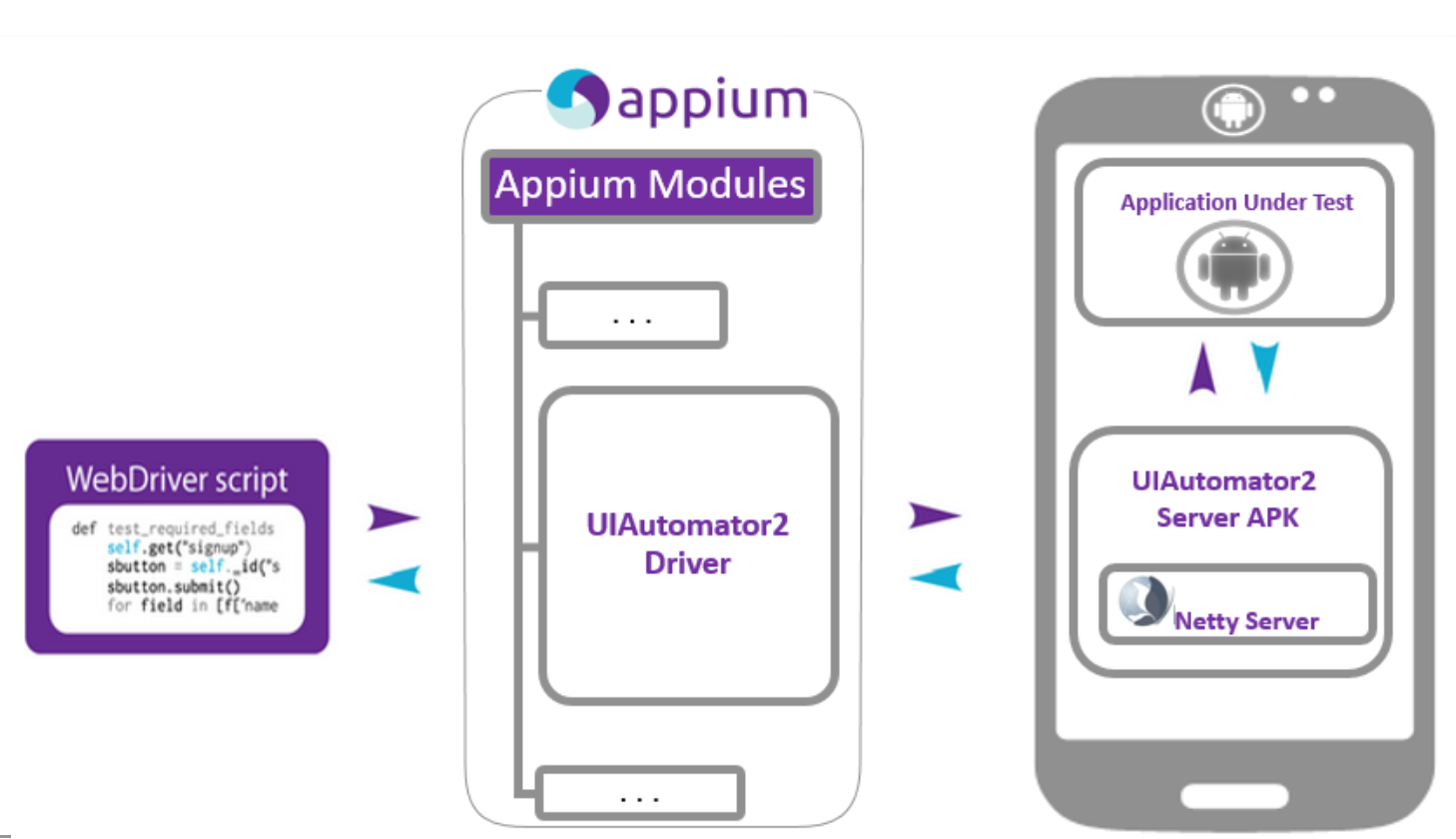
Appium 引擎列表
| Platform | Driver | Platform Versions | Appium Version | Driver Version |
|---|---|---|---|---|
| iOS | XCUITest | 9.3+ | 1.6.0+ | All |
| UIAutomation | 8.0 to 9.3 | All | All | |
| Android | Espresso | ?+ | 1.9.0+ | All |
| UiAutomator2 | ?+ | 1.6.0+ | All | |
| UiAutomator | 4.3+ | All | All | |
| Mac | Mac | ?+ | 1.6.4+ | All |
| Windows | Windows | 10+ | 1.6.0+ | All |
Appium 环境安装
- Android 环境配置
https://ceshiren.com/t/topic/2270
- iOS 环境配置
https://ceshiren.com/t/topic/5530
- 几点建议:
1、Appium Desktop版本不要太老1.15以上
2、Java 1.8
3、SDK build-tools/ 下对应的版本,需要使用<=29的版本
Android 自动化前提依赖
- Appium Desktop:入门学习工具
- 设备:模拟器(网易 mumu)或真机
- Android SDK
- 其它 Appium 环境
测试用例录制
配置待测应用
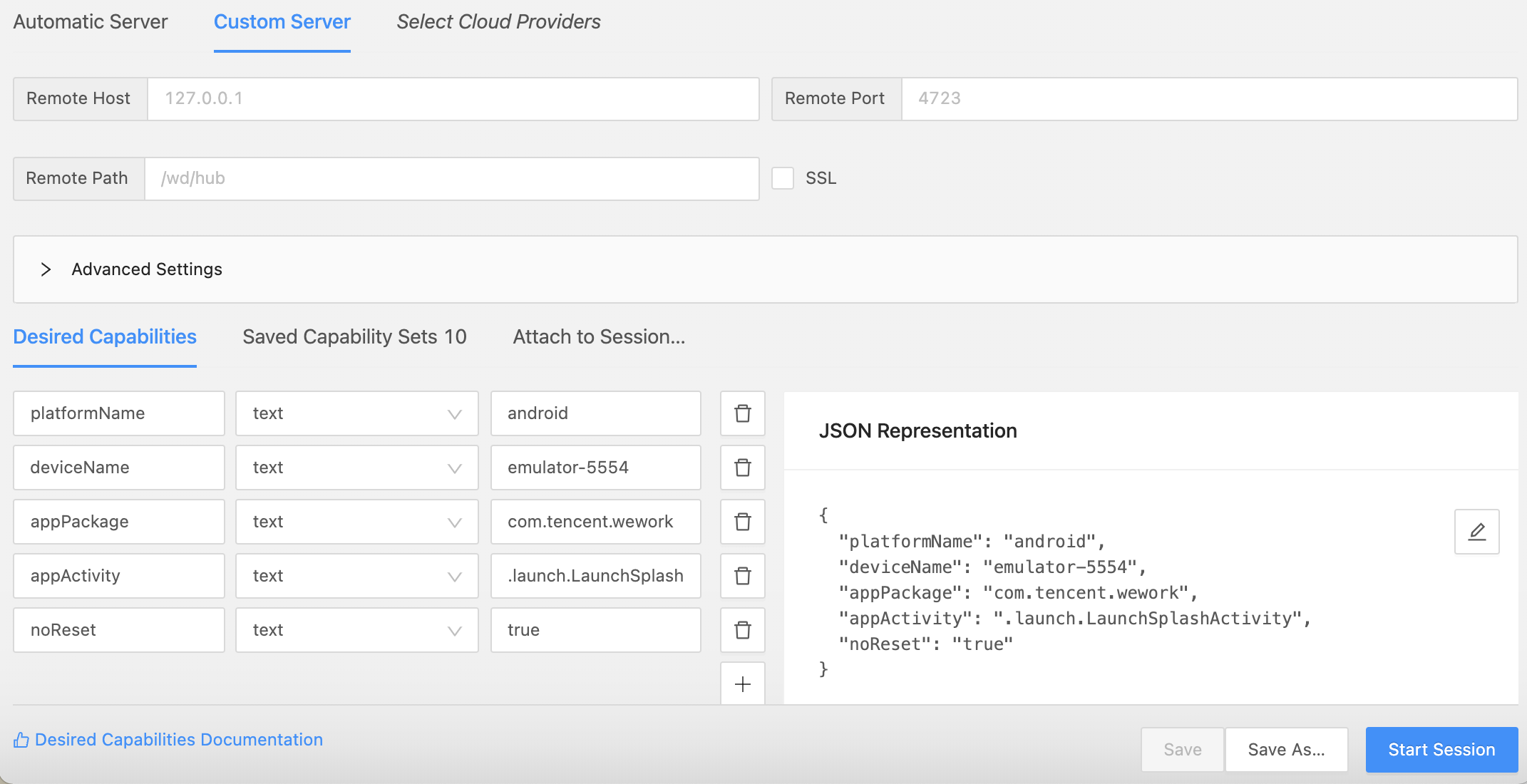
获取 App 的信息
app 入口,两种方式获取:
1、通过 logcat 日志获取
mac/Linux:  adb logcat ActivityManager:I | grep “cmp"

windows: adb logcat ActivityManager:I | findstr "cmp" 后启动目标应用
2、通过 aapt 获取
mac/Linux: aapt dump badging wework.apk  | grep launchable-activity

Windows: aapt dump badging wework.apk  | findstr launchable-activity
启动应用命令
adb shell am start -W -n <package-name>/<activity-name> -S
自动化用例编写
| Language/Framework | Github Repo and Installation Instructions |
|---|---|
| Ruby | https://github.com/appium/ruby_lib, https://github.com/appium/ruby_lib_core |
| Python | https://github.com/appium/python-client |
| Java | https://github.com/appium/java-client |
| JavaScript (Node.js) | https://github.com/admc/wd |
| JavaScript (Node.js) | https://github.com/webdriverio/webdriverio |
| JavaScript (Browser) | https://github.com/projectxyzio/web2driver |
| Objective C | https://github.com/appium/selenium-objective-c |
| PHP | https://github.com/appium/php-client |
| C# (.NET) | https://github.com/appium/appium-dotnet-driver |
| RobotFramework | https://github.com/serhatbolsu/robotframework-appiumlibrary |
企业微信实战
- 实战应用 企业微信
- 环境:
- MacOS 系统
- Android 模拟器 : 网易 mumu
- Appium Desktop
企业微信打卡案例
前提条件
已登录状态( noReset=True)
打卡用例:
1、打开【企业微信】应用
2、进入【工作台】
3、点击【打卡】
4、选择【外出打卡】tab
5、点击【第N次打卡】
6、验证【外出打卡成功】
7、退出【企业微信】应用
参考代码
DesireCapability 配置
caps["noReset"] = "true"
caps['settings[waitForIdleTimeout]'] = 0   # 等待页面空闲的时间

caps['skipServerInstallation'] = ‘true'  # 跳过 uiautomator2 server的安装
caps['skipDeviceInitialization'] = ‘true'    # 跳过设备初始化
caps['dontStopAppOnReset'] = ‘true'    # 启动之前不停止app
滚动查找元素:
self.driver.find_element(MobileBy.ANDROID_UIAUTOMATOR,'new UiScrollable(new UiSelector().scrollable(true).instance(0)).scrollIntoView(new UiSelector().text("添加成员").instance(0));')
课后作业
使用 Appium 实现自动化添加联系人